Agentic AI Workflows
How to give language models memory, tools, and the ability to act across multi-step tasks — and why the architecture decisions you make here determine whether your system is reliable or fragile.
What Is an Agentic AI Workflow?
An agentic AI workflow is a system where a language model takes actions across multiple steps, using tools and memory, to complete a goal it wasn't given a script for. Instead of receiving a prompt and returning a single response, the agent perceives its environment, decides what action to take, executes that action (calling an API, writing a file, searching the web), observes the result, and loops — until the task is done or it determines it can't proceed.
The shift from "LLM as a function" to "LLM as an agent" is not incremental. It changes the failure modes, the testing surface, the cost profile, and the level of human oversight required. A single-turn LLM call that goes wrong produces one bad output. An agentic loop that goes wrong can take 40 actions before you notice, and some of them may be hard to reverse.
What Changes When You Go Agentic
- Multi-step execution: the model takes a sequence of actions, not just one response. Each action can trigger further actions.
- Tool use: the agent can call external APIs, run code, read files, search the web, write to databases — anything you expose to it.
- Memory: state persists across steps. The agent knows what it already did and what it found.
- Non-determinism compounds: small errors in step 3 cascade into larger ones by step 8. Test coverage for agentic systems needs to be significantly higher than for single-turn LLMs.
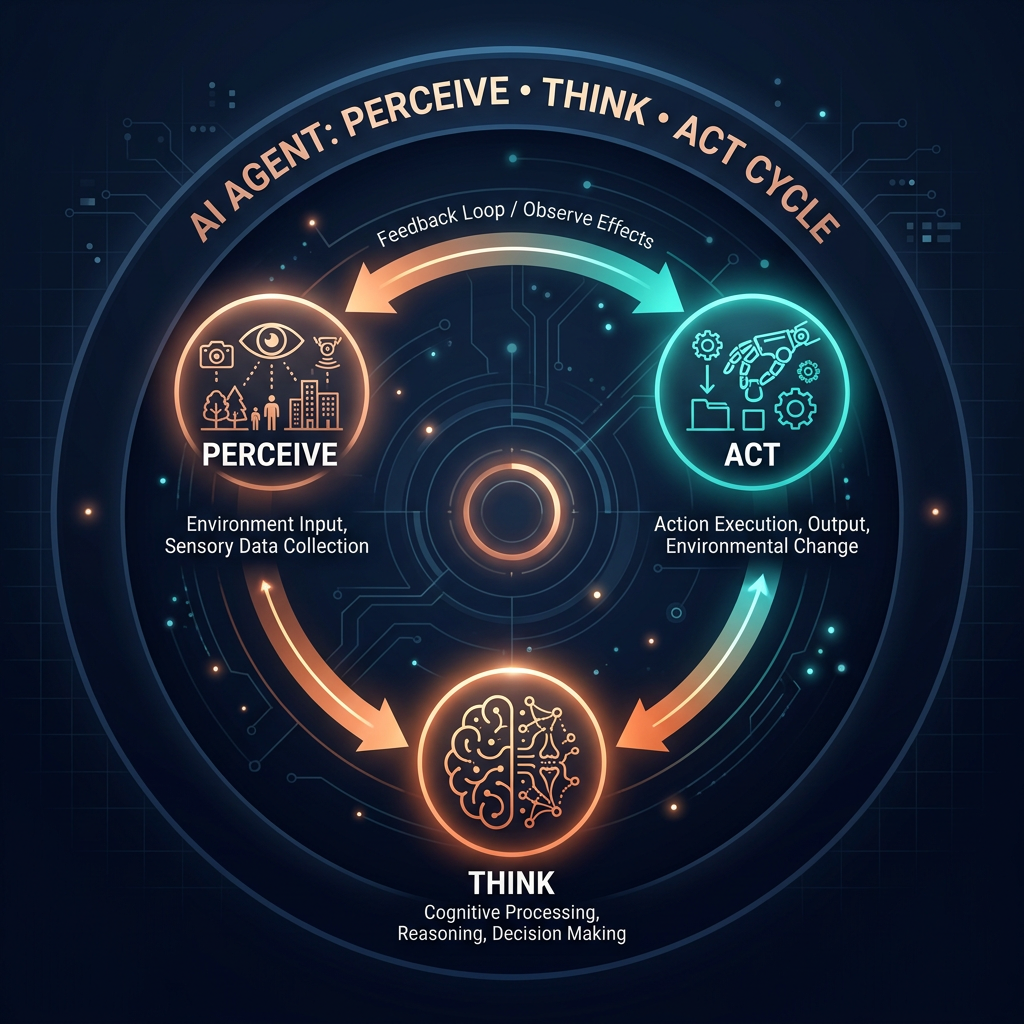
The perceive → think → act → observe loop is the foundation of every agentic system
Memory Types — How Agents Remember
Memory is the most important architectural decision in an agentic system. Every agent has working memory (its context window), but what you choose to do with information outside that window determines whether your agent can operate over long time horizons, across sessions, or at scale. There are four categories to understand.

What Breaks Without Good Memory Design
- Context overflow: without summarization or external memory, long tasks fill the context window and the model loses track of early steps.
- Repeated work: without episodic memory, the agent re-calls tools it already called, wastes tokens, and inflates cost.
- No continuity across sessions: every conversation starts from zero unless semantic memory retrieves relevant history.
- Start with working memory only. Add external memory only when you have a specific problem it solves — don't build a vector database "just in case."
Tools & Model Context Protocol (MCP)
Tools are what separate an agentic system from a chatbot. A tool is anything the agent can call to interact with the world outside its context window: search the web, read a database, write a file, call an API, execute code. The quality and scope of an agent's tool suite determines what problems it can actually solve.

Model Context Protocol (MCP)
- MCP is an open standard for connecting AI models to external tools and data sources. Think of it as a universal adapter between agents and the rest of your stack.
- Instead of hard-coding each tool integration, MCP defines a common protocol: the agent asks for available tools, the MCP server declares them, the agent calls them by name.
- Tools exposed via MCP are discoverable at runtime — the agent loads only what it needs for the current task, not the full tool set every time.
- MCP servers can expose: file systems, databases, web search, REST APIs, custom business logic — any capability you build a server for.
- Security boundary: MCP servers control what the agent can and cannot do. Build principle of least privilege into your MCP server design from day one.
Common Tool Categories
- Read tools: web search, database queries, file reads, API GETs. Low risk, high information value.
- Write tools: file writes, database mutations, API POSTs. Higher risk — require confirmation flows for destructive operations.
- Compute tools: code execution, calculations, transformations. Risk depends on the execution environment's sandboxing.
- Communication tools: sending emails, Slack messages, creating calendar events. Irreversible by default — treat with care.
The Autonomy Spectrum
Not every AI task needs a fully autonomous agent. The autonomy spectrum runs from a simple LLM call with no tools to a fully autonomous system that operates without any human checkpoints. Where you sit on that spectrum should be a deliberate architectural choice, not an accident of how much you trusted the LLM.
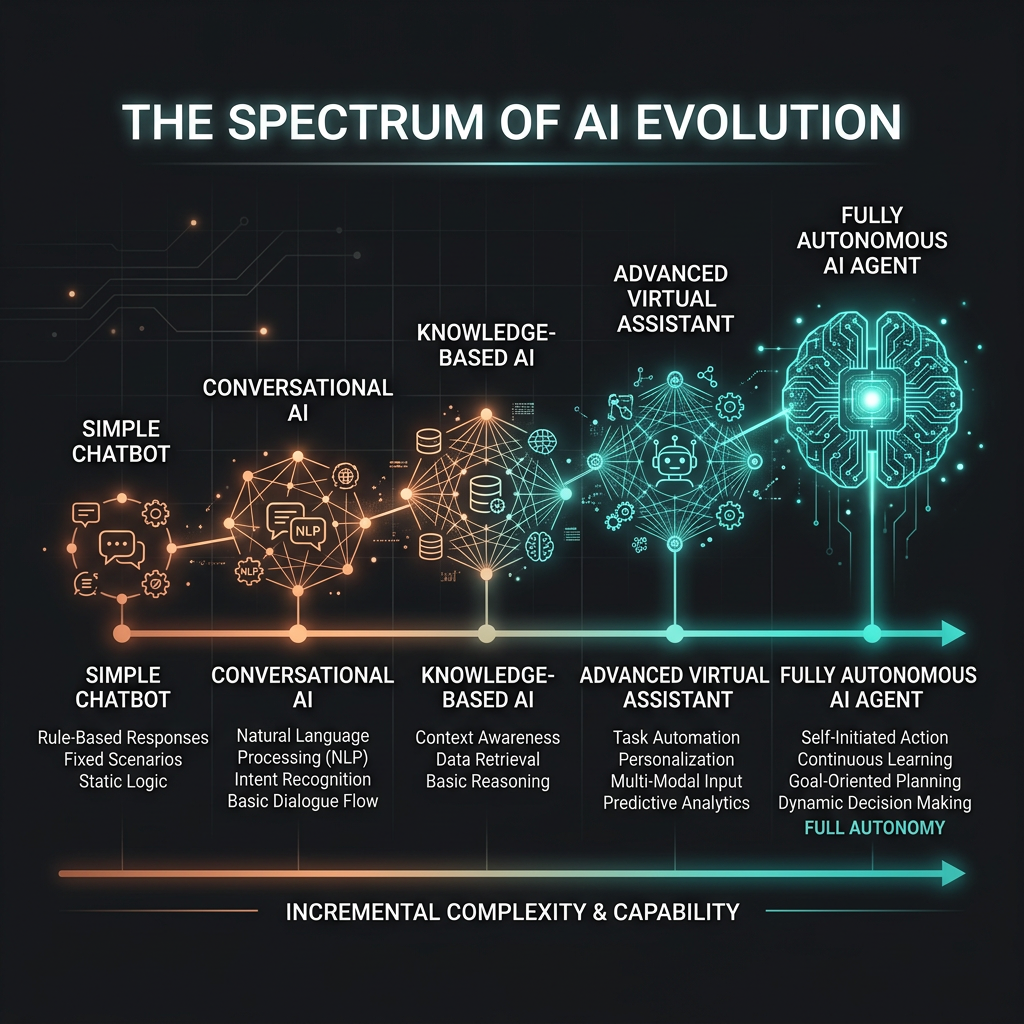
Five Levels of Autonomy
| Level | Description | Human Role | When to Use |
|---|---|---|---|
| 0 — Single Call | One prompt, one response. No tools, no loops. | Reviews output | Simple generation, classification, summarization |
| 1 — Tool-Augmented | Single call with access to tools. LLM calls one or two tools per task. | Reviews output | Q&A over documents, single-step lookups |
| 2 — Multi-Step | Agent loops over several steps. Human not in the loop during execution. | Reviews final output | Research tasks, data pipelines, form processing |
| 3 — Human-in-the-Loop | Agent runs autonomously but pauses at key decision points for human approval. | Approves key actions | Anything involving writes, money, or external communication |
| 4 — Fully Autonomous | Agent runs end-to-end with no human checkpoints. | Monitors and audits | High-confidence, well-defined tasks only. Rare in production. |
Building Reliable Agents — What Actually Breaks
Most agent failures in production are not model failures — the LLM reasons fine. They're systems failures: the agent didn't know when to stop, couldn't recover from a tool error, took an irreversible action on a wrong assumption, or ran into a context boundary it wasn't designed to handle. These are engineering problems, not prompting problems.
The Five Most Common Agent Failure Modes
- Infinite loops: the agent keeps calling tools and never terminates. Fix with explicit step budgets and a termination condition the model checks at each step.
- Tool error propagation: a tool returns an error and the agent treats it as data, continuing with wrong state. Fix with explicit error handling that distinguishes tool failure from valid empty results.
- Over-confidence on ambiguous tasks: the agent makes assumptions and acts on them rather than asking for clarification. Fix with a planning step — have the agent state its interpretation before acting.
- Context saturation: the task runs long enough that early context is lost. Fix with periodic summarization steps that compress history into working memory.
- Scope creep: given a broad tool set, the agent does more than asked. Fix with a minimal tool surface — only expose tools the agent needs for the specific task.
The Four Engineering Safeguards
- Step budget: set a maximum number of tool calls per run. Hard fail and escalate if hit. Never let an agent run unbounded.
- Confirmation gates: require human approval before any irreversible action — sending messages, writing to production databases, spending money.
- Structured output validation: validate tool call parameters before execution. Reject malformed calls at the gate rather than handling downstream errors.
- Audit logging: log every tool call, its parameters, its result, and the agent's reasoning. This is not optional — it's how you debug production failures and build confidence over time.
Decision Framework — When to Use Agentic Workflows
Agentic AI workflows are the right architecture when a task requires multiple steps, external information, or actions that depend on intermediate results. They are the wrong architecture when a single well-crafted prompt can produce the output you need. The overhead of a loop, tools, and memory is only worth it when the task genuinely requires that machinery.
| Situation | Use Agentic? | Why |
|---|---|---|
| Task needs real-time data the model wasn't trained on | Yes | Needs a retrieval tool (search, database lookup) |
| Task spans multiple steps with conditional branching | Yes | Single-turn LLM can't execute the full sequence |
| Task involves writing to an external system | Yes — with confirmation gate | Needs write tools; irreversibility requires human approval |
| Task is well-defined, inputs known, output format fixed | No | A prompt + structured output handles this cheaper and faster |
| Task is creative generation (write, summarize, translate) | No | No external state needed; single call suffices |
| Task requires expertise not in the model's training data | RAG first | Retrieval is cheaper than an agent loop for pure knowledge gaps |