LLM Evaluation (Evals)
You can't improve what you can't measure. A practical guide to building evaluation infrastructure for LLM applications — unit evals, LLM judges, tracing, and the eval-driven development loop.
Why Evals Are Non-Negotiable
An eval suite is the set of tests that tell you whether your LLM application is working. Without evals, prompt changes are guesses, model upgrades are gambles, and production regressions are discovered by users rather than developers. Teams that skip evals move fast initially but spend disproportionate time debugging production failures that a basic eval would have caught in staging.
What evals make possible
Evals enable four things that are otherwise impossible with LLM applications: (1) Confident prompt changes — run evals before and after, see whether accuracy improved or regressed. (2) Safe model upgrades — test the new model against your eval suite before switching traffic. (3) Component-level debugging — when a RAG pipeline fails, evals on retrieval and generation separately tell you which component failed. (4) Regression detection — catch quality degradation from API updates or data drift before it reaches users.
Types of Evals
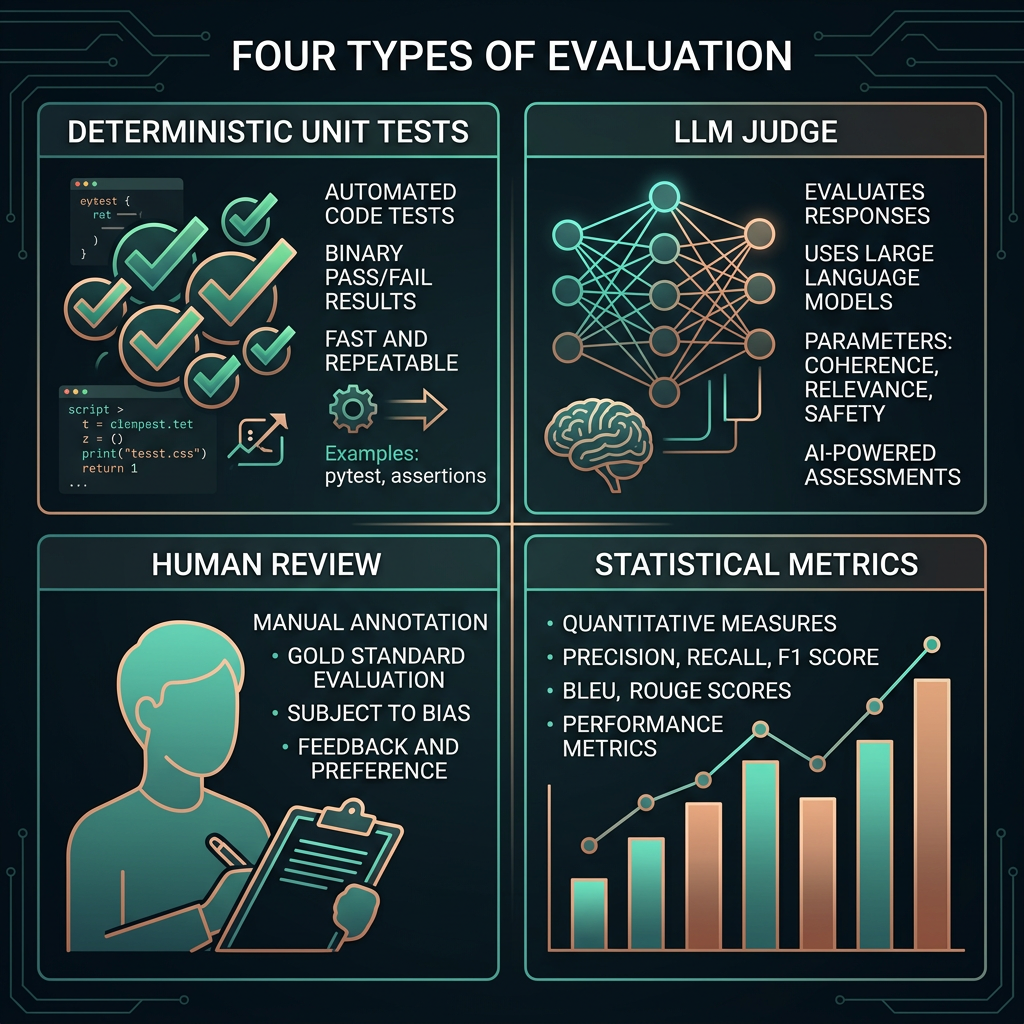
LLM evals exist at three granularities, analogous to unit, integration, and end-to-end tests in traditional software. Each catches different failure types. Running all three at different stages of your pipeline gives you the coverage to diagnose failures at the right level of abstraction.
Eval scoring approaches
Exact match works for classification and structured output tasks where there's one correct answer. Reference-based scoring compares output to a gold standard using metrics like ROUGE or BERTScore. Rubric-based LLM judging defines criteria in natural language and uses an LLM to score against them — the right approach for subjective quality tasks like tone, clarity, and helpfulness. Each approach has appropriate use cases; mixing them up produces misleading metrics.
LLM as Judge
LLM-as-judge uses a language model to evaluate another language model's outputs against a rubric. It scales subjective quality assessment in a way that human annotation cannot — once you have a reliable judge prompt, you can evaluate thousands of outputs automatically. Research consistently shows that frontier LLMs achieve 80–90% agreement with human raters on well-defined rubrics, making this practical for most production eval needs.
How to build a reliable judge prompt
- Define the evaluation criteria clearly in natural language. Vague criteria ("Is this good?") produce inconsistent scores. Specific criteria ("Does the response directly answer the question without adding unrequested information?") produce reliable ones.
- Use a rubric with 3–5 levels and concrete descriptions for each level. Anchor each score to observable properties of the output, not abstract quality judgments.
- Provide the judge with the original question, any context documents, and the response being evaluated. Context is essential for faithfulness scoring.
- Ask for reasoning before the score. "Explain what you notice about the response, then assign a score" produces more accurate scores than direct scoring.
- Validate judge accuracy on a sample of human-annotated examples before relying on it for automated decisions.
Building an Eval Suite
An eval suite is a curated set of test cases, scoring functions, and pass/fail thresholds that together define what "working correctly" means for your application. Starting small is fine — 20 well-chosen test cases covering your core use cases and known failure modes will catch most regressions. Comprehensive coverage matters less than test quality and running the suite consistently.
What to include in a starter eval suite
- Golden cases: 5–10 examples of ideal behavior that the system should always handle correctly. These form your regression floor.
- Edge cases: Inputs that represent boundary conditions — very long inputs, adversarial phrasings, domain-edge vocabulary. These catch prompt brittleness.
- Failure cases: Real examples of past failures, manually corrected. Every production failure should become an eval case so it can't silently return.
- Distribution sample: Random sample from actual production queries. Ensures your eval set reflects what real users actually ask, not what you assumed they'd ask.
Traces and Observability
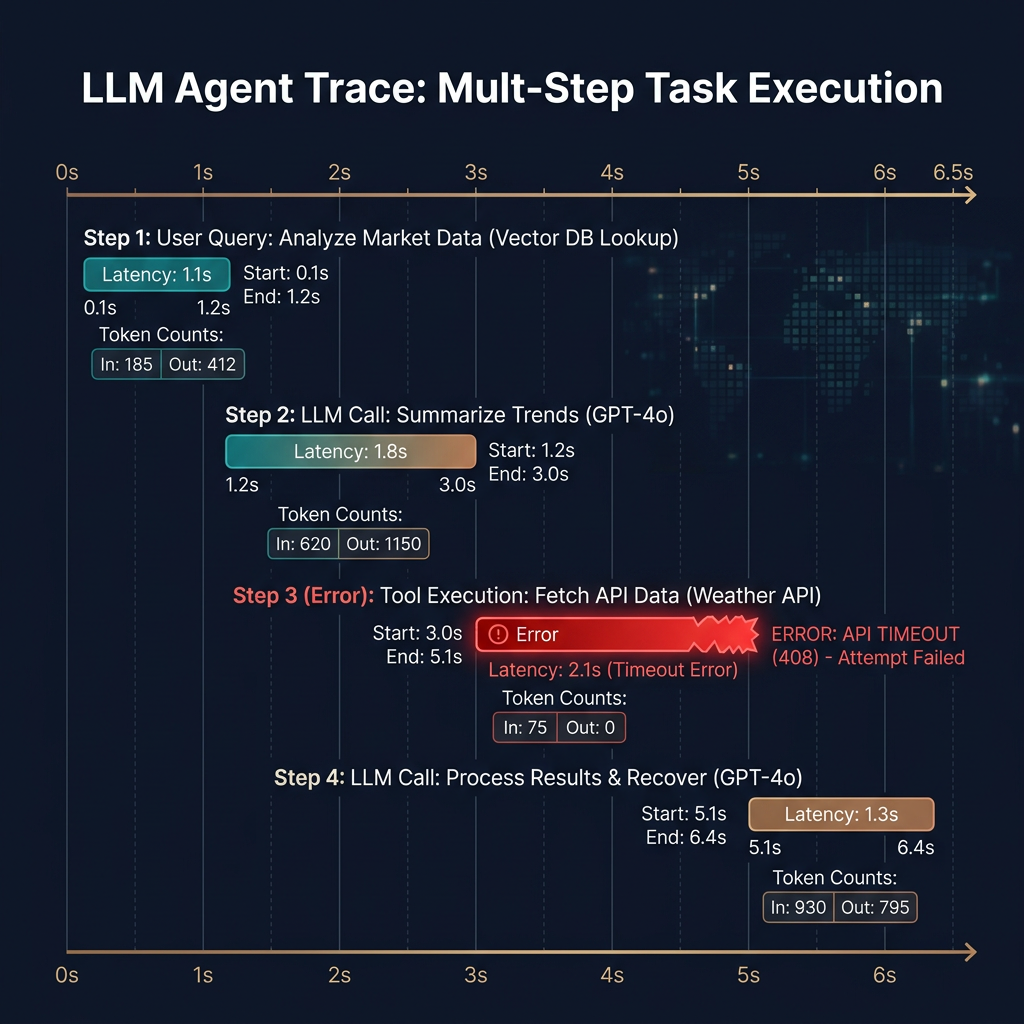
A trace captures the full execution path of an LLM application — every prompt sent, every response received, every retrieval call made, and every tool invoked — with latency and token counts at each step. Traces are the observability primitive for LLM applications. Without them, debugging production failures requires reproducing the exact inputs and guessing which step failed. With them, you see exactly what happened and where the pipeline broke.
What to instrument
| Instrumentation point | What to capture | Why |
|---|---|---|
| LLM calls | Full prompt (system + user), response, model, latency, token counts, temperature | Reproduces exact inputs for debugging; tracks cost |
| Retrieval calls | Query, retrieved chunks with scores, latency | Isolates retrieval failures from generation failures |
| Tool calls (agents) | Tool name, input, output, success/failure, latency | Diagnoses agent execution failures step by step |
| User feedback | Thumbs up/down, free text, session ID | Ground truth signal for judge calibration |
Tracing tools: LangSmith, Braintrust, Langfuse (open-source), and Weights & Biases Weave all offer LLM-specific tracing. For simpler needs, structured logging with a unique trace ID per request and OpenTelemetry spans is sufficient.
Eval-Driven Development
Eval-driven development (EDD) applies the test-driven development principle to LLM applications: define what success looks like before building, measure it after every change, and don't ship unless the number goes up. The loop runs continuously: identify a failure mode from production traces, add eval cases for it, change the prompt or pipeline, run evals, repeat. Over time the eval suite becomes a complete specification of what the system is supposed to do.